directory
- [Quick Start: 3 Steps to Generate First AI Photo](#1. Quick Start: 3 Steps to Generate Your First AI Photo)
- [What is AI style? ](#2. What is AI style? )
- [What is the composition of an AI photo? ](#3. What makes up an AI photo? )
- [How to write good prompt words?](#4. How to write good prompt words? )
- [How to create a scene diagram?](#5.How to create a scene diagram? )
- [Backend Operation Guide?](#6 Backend Operation Guide)
- [Frequently Asked Questions?](#7 Frequently Asked Questions)
1. Quick Start: 3 Steps to Generate Your First AI Photo
You don't need to understand the technology, just follow along:
| Steps | What to do | Where to do it |
|---|---|---|
| ① Prepare photos | Choose a clear personal photo | Find it on your phone or take it now with a camera |
| ② Choose a style | Choose a favorite effect template | AI camera homepage |
| ③ Wait for generation | Scan code to upload, wait for 30 seconds | Phone or device |
Done! Your AI photo has been generated and can be printed or saved directly.
2.What is AI style?
Simply put
AI style=photo effect template
Just like a "filter" for taking photos on a mobile phone, but more powerful - it can turn your photos into various effects: -China-Chic Cartoon Style -3D illustration style -Film texture style -Animation anime -Wait a minute ..
Where to use it?
| Equipment | Description | Images |
|---|---|---|
| AI photo booth | Self service photography equipment in shopping malls/scenic spots |  |
| mobile H5 | Scan the code to access with a mobile phone |  |
| self-service kiosk | Fully self-service terminal | 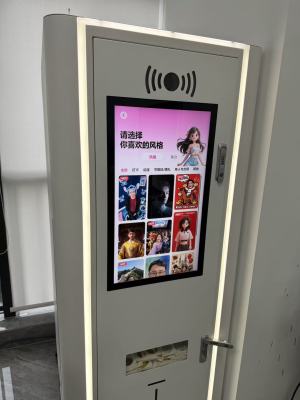 |
Styles can be classified and managed
Similar styles can be placed in a 'style group', such as: -Travel Series: Great Wall, Seaside, Snow Mountain .. -Holiday Series: Spring Festival, Mid Autumn Festival, Christmas ..
*Benefit *: Convenient management and easy for users to find.
3. What makes up an AI photo?
core formula
Photo+prompt words+(optional) scene image=AI generated imageDetailed explanation of three elements
| Element | What is it | Is it mandatory | Example |
|---|---|---|---|
| Photo taken | The personal photo you uploaded | ✅ must | You can take selfies or he can take them |
| prompt | Tell AI what effect they want | ✅ must | "3D cartoon style, bright colors" |
| scene image | Background reference image | ⭕ optional | Scenes such as the Great Wall and beaches |
Two generation modes
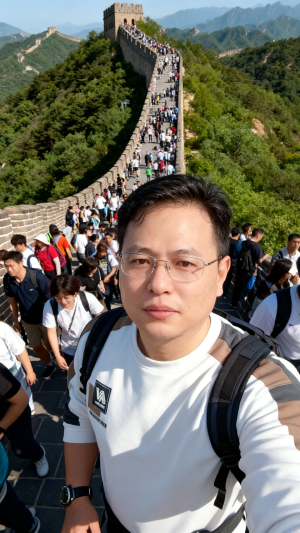
Mode 1: Scene Map (Suitable for Travel/Specific Scenarios)
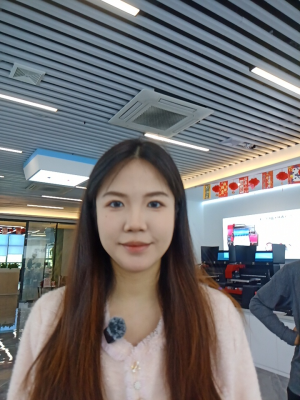
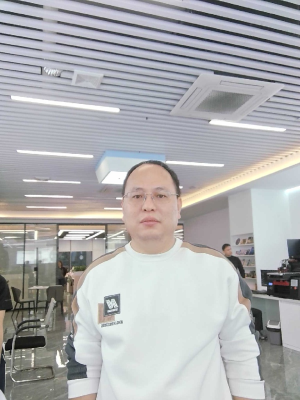
Your photo+Great Wall background image+prompt words=AI photo of you standing on the Great Wall| Photo | → Scene Image | → Generate Image |
|---|---|---|
 |
 |
 |
 |
 |
 |
 |
 |
 |
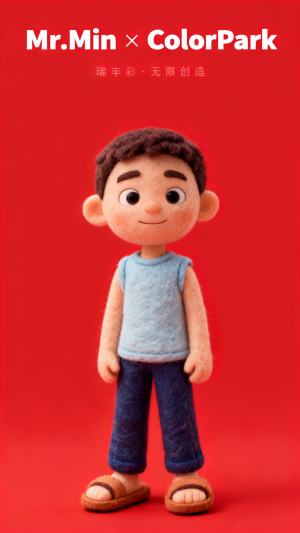
Mode 2: No scene image (suitable for pure style conversion)
Your photo+prompt=AI photo in comic style| Take a photo | → Generate a photo |
|---|---|
 |
 |
 |
 |
*Tip *: Do you need a scene image? The system will prompt you to choose when creating a style.
4.How to write good prompt words?
universal formula
Tip words=What to shoot+What style+How clear+What details are there
Four element disassembly
| Element | Description | Example |
|---|---|---|
| What to take | Main content | "Full body photo of the person" "Couple photo" |
| What style | Visual effects | "3D cartoon", "China-Chic cartoon", "film texture" |
| Multi definition | Image quality requirements | "High definition and delicate" "4K image quality" |
| What are the details? | Light and shadow/action/atmosphere | "Side light, smile, warm tone" |
Comparison of good and bad examples
❌ Bad prompt words (too vague)
"Look better, look better"→ AI I don't know what effect you want
✅ Good prompt words (specific and clear)
3D illustration style, high color saturation, clear facial features of characters,
Retain the original clothing, blur the background, warm and sunny tones, high-definition and delicate“
→ AI Able to accurately understand your needs.
Lazy Hack: Let AI Write It for You
Struggling to write prompts? Use these tools:
- dou bao AI
- yuan bao AI
- JiMeng AI
Usage: Tell it what effect you want to achieve, and let it generate the prompts for you.
5. How do you create a scene diagram?
What is a scene graph?
Scene Illustration = Background Reference Image
Used to tell the AI: "Put me into this scene."
When is a scene graph needed?
| Scenario | Required? | Example |
|---|---|---|
| Travel souvenirs (Great Wall, Seaside) | ✅ Required | Composite you into a Great Wall background. |
| Holiday Themes (Spring Festival, Christmas) | ✅ Required | Add a festive background. |
| Pure Style Transfer (Manga, Oil Painting) | ❌ Not required | Change only the art style, not the background. |
Three Ways to Obtain
Method 1: Shoot It Yourself
- Capture real-world scenes using a mobile phone or camera.
- Requirements: Clear, well-lit, and with a distinct subject.
- Note: Ensure that you hold the copyright or that the images were taken by you personally.
Method 2: AI Generation
Generate scenes directly using AI tools:
- JiMeng AI
- dou bao AI
- yuan bao AI
Prompt Examples:
"Great Wall sunset scene, crowds of tourists, warm tones, HD landscape photograph."Method 3: Design Software
Design scene illustrations using tools such as Photoshop
- Suitable for: Scenes requiring precise control
- Requirements: A foundational understanding of design principles
6. Backend Operations Guide
System Login
- Website URL:https://ops.colorpark.cn/
- username/password:Contact official personnel to obtain.
6.1 Add a new AI style
step:
- Enter "My AI" List
- Click the Add button.
- Fill in Information:
- Style Name (e.g., "Great Wall Travel Style")
- Select whether a scene image is required
- Upload scene image (if required)
- Enter prompt
- Click Save
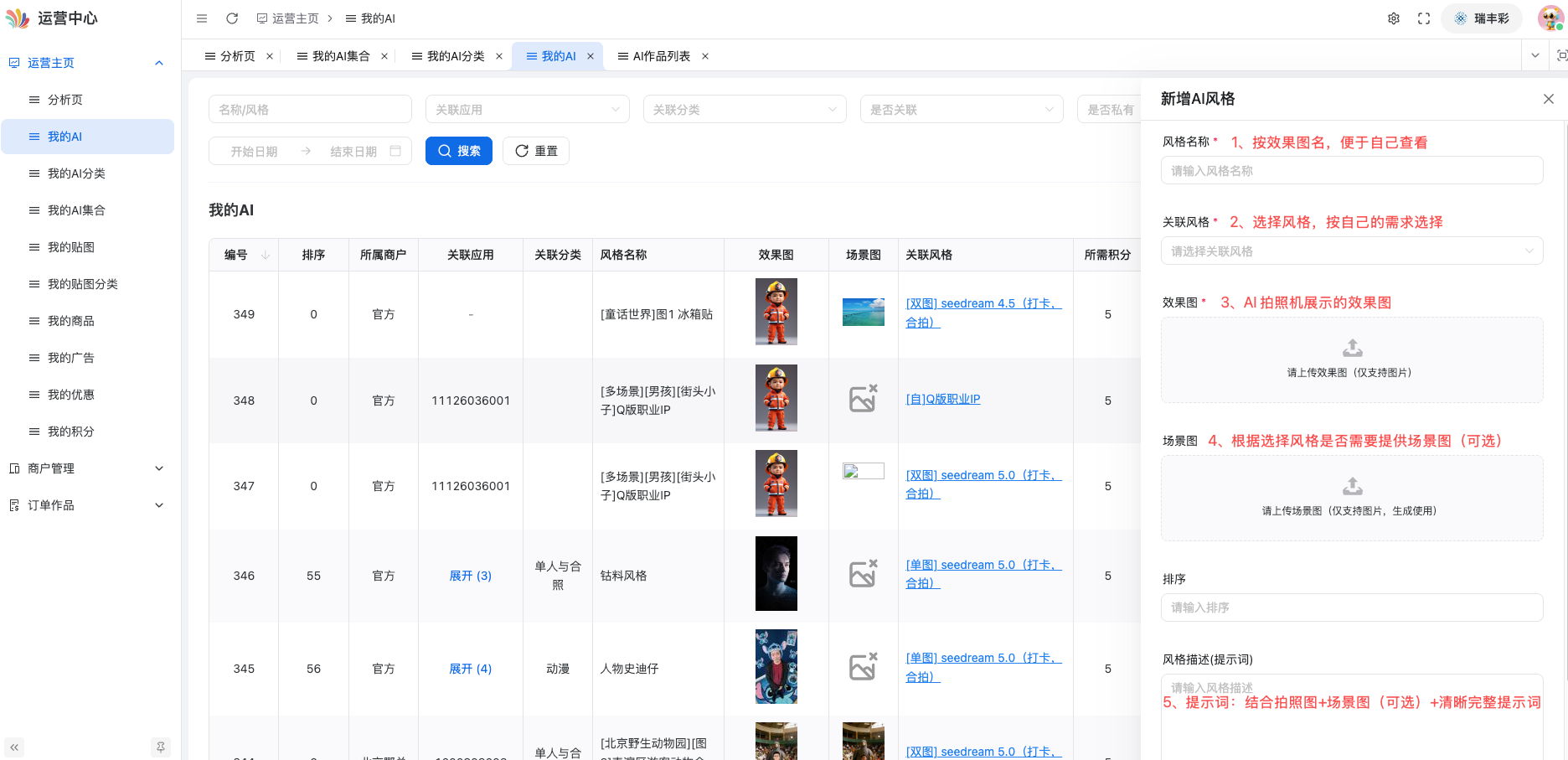
✅ Complete! New style created.
6.2 Adjusting Style Effects
步骤:
- Enter "My AI" List
- Locate the style you wish to debug, then click Style Debugging.
- Upload a test photo.
- Enter Prompt (Optional)
- Click Start Debugging
- Wait about 30 seconds to check the result.
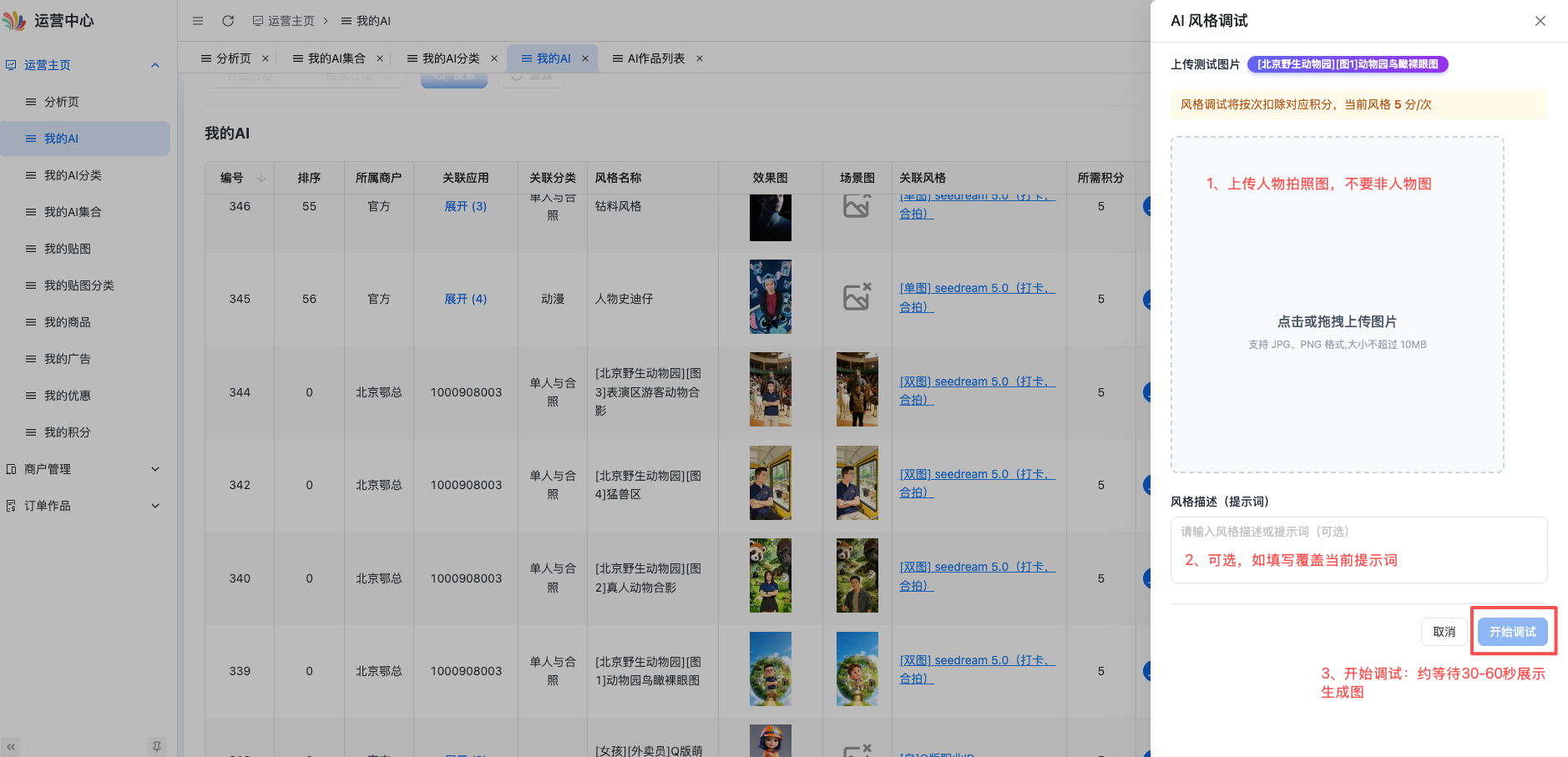
⚠️ Note: Each debugging session consumes credits; please check your credit balance in advance.
6.3 Deploy to Device
Steps:
- Go to the "My Apps" list.
- Click Details for the app you wish to configure.
- Click Assign AI Styles.
- Select the styles you want to assign.
- Click Confirm.
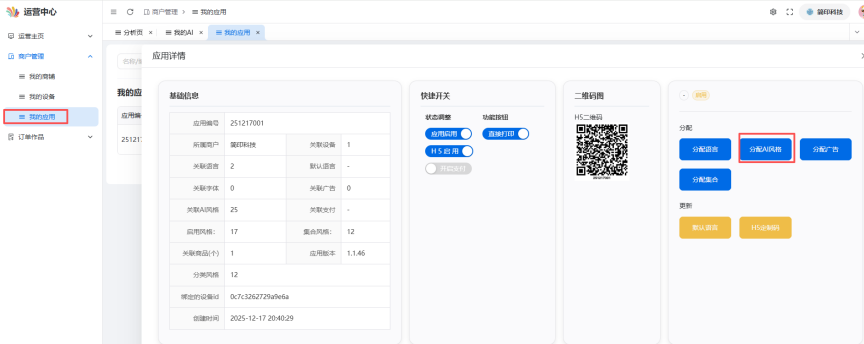
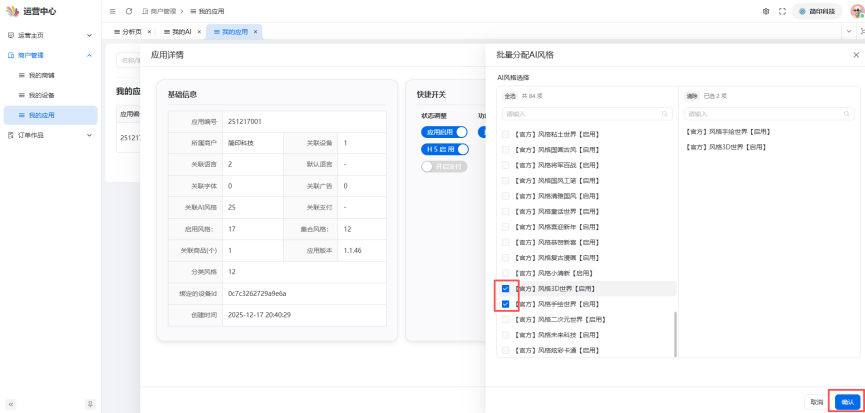
✅ Done! Users can now see this style on the corresponding devices.
6.4 View Generated Works
Steps:
- Go to "Order Works."
- Click AI Works List.
- You can view all user-generated AI photos.
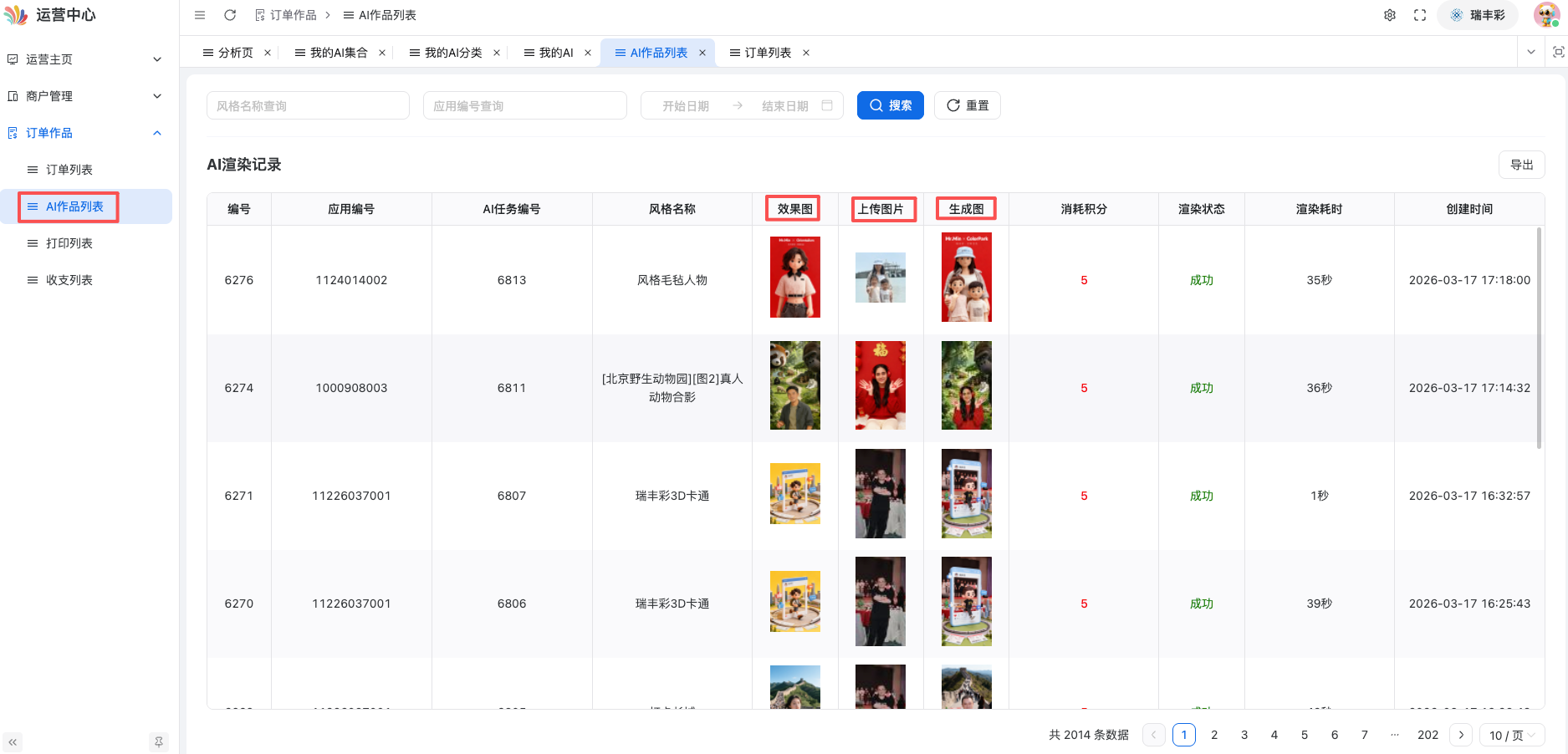
7. Frequently Asked Questions
Q1:How long does it take to generate a photo?
A:It usually takes around 30 seconds. If it takes longer than one minute, the system may be busy; we recommend trying again.
Q2:Did you write a prompt, but the results weren't great?
A:Try optimizing it this way.:
- Be Specific: Instead of "good-looking," say "3D cartoon, vibrant colors."
- Add Detail: Describe the lighting, angles, and atmosphere.
- Use Tools: Let an AI assistant help you optimize your prompts.
Q3:Where can I find scene images?
A:Three Sources:
- Shoot it yourself (Safest option; no copyright issues)
- AI Generation (Using tools like Doubao, Jimeng, etc.)
- Stock Media Sites (Pay attention to copyright)
Q4:How do I earn points?
A:You can top up directly via the operational platform, or contact an official representative for assisted top-ups (which requires an advance transfer). Currently, a single use of the AI model is estimated to cost at least 5 points. The exchange rate for top-ups is 1 RMB = 10 points, and a bonus of 2,000 points is automatically granted upon your first sign-up.
Q5:Can the generated photos be used for commercial purposes?
A:Yes, that is fine. However, please ensure that:
- The photographs were taken by you or that you have obtained the necessary authorization;
- The scene imagery is free of any copyright disputes.
Q6:Can I regenerate it if I'm not satisfied with the result?
A:Yes. Simply re-upload the photo or adjust the prompt, then generate it again (this will consume credits).
Need help?
If you have any other questions, please contact official support.
Target Audience: Partner Merchants, Operations Staff, Content Creators